Time & Work
Hours in, approved, paid.
Time entry, approvals, PTO, and scheduling in one loop. The hours a consultant logs against a client project are the same hours that bill the client and pay the person.

This week
What's included
What the Time & Work module covers
Designed for teams that bill their time as well as teams that just need attendance and leave to be correct.
Timesheets
Weekly grid or a running timer. Entries attach to a project, task, and client so billable and internal hours separate themselves.
Approvals
Managers review a whole week at once, comment on individual lines, and approve or reject in bulk. Rejections notify and reopen the sheet.
Time off
Accrual policies by country and employment type, balances that update as requests are approved, and a shared calendar of who is out.
Scheduling
Shift planning with coverage rules, swap requests, and demand forecasting so you staff to expected volume rather than last month's roster.
Capacity
Team and individual utilisation against target. See who is over 100% before the week starts, not after the project slips.
Projects
Budgets in hours and money, staffing assignments, burn-down against budget, and per-project margin once costs land.

The screens
Time & Work in the product
Screens from the working product, filled with sample data so you can see the shape of the thing before you talk to us.
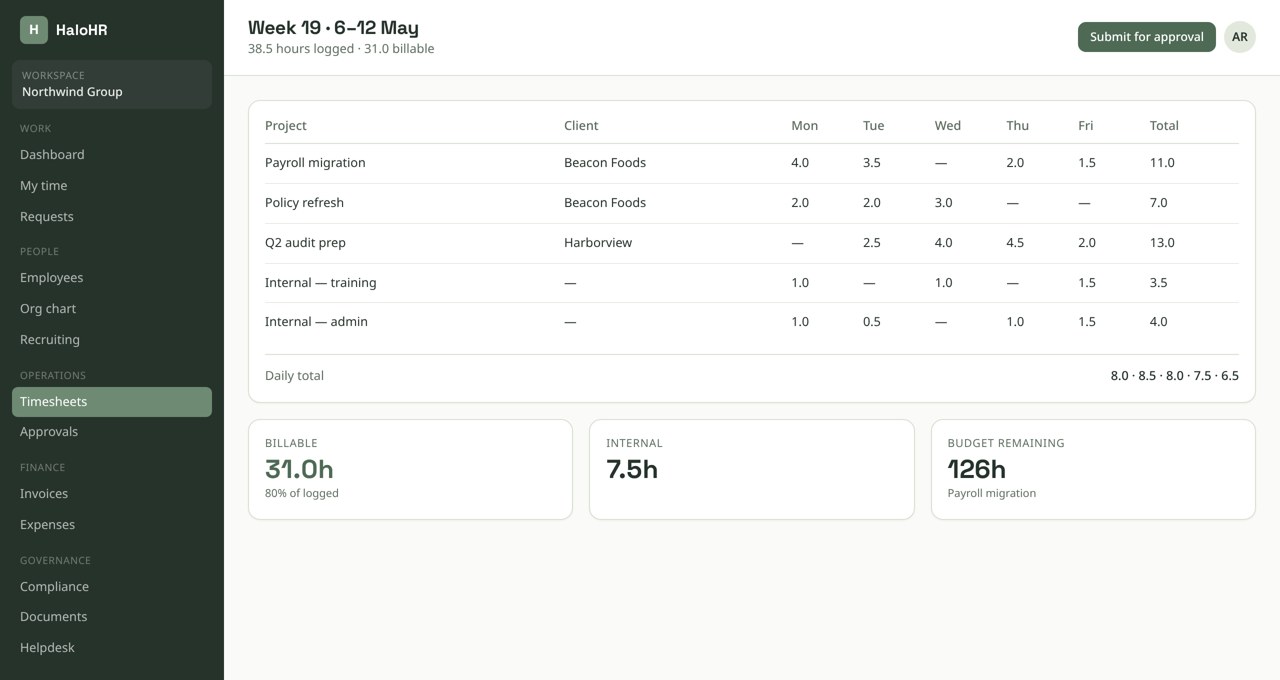
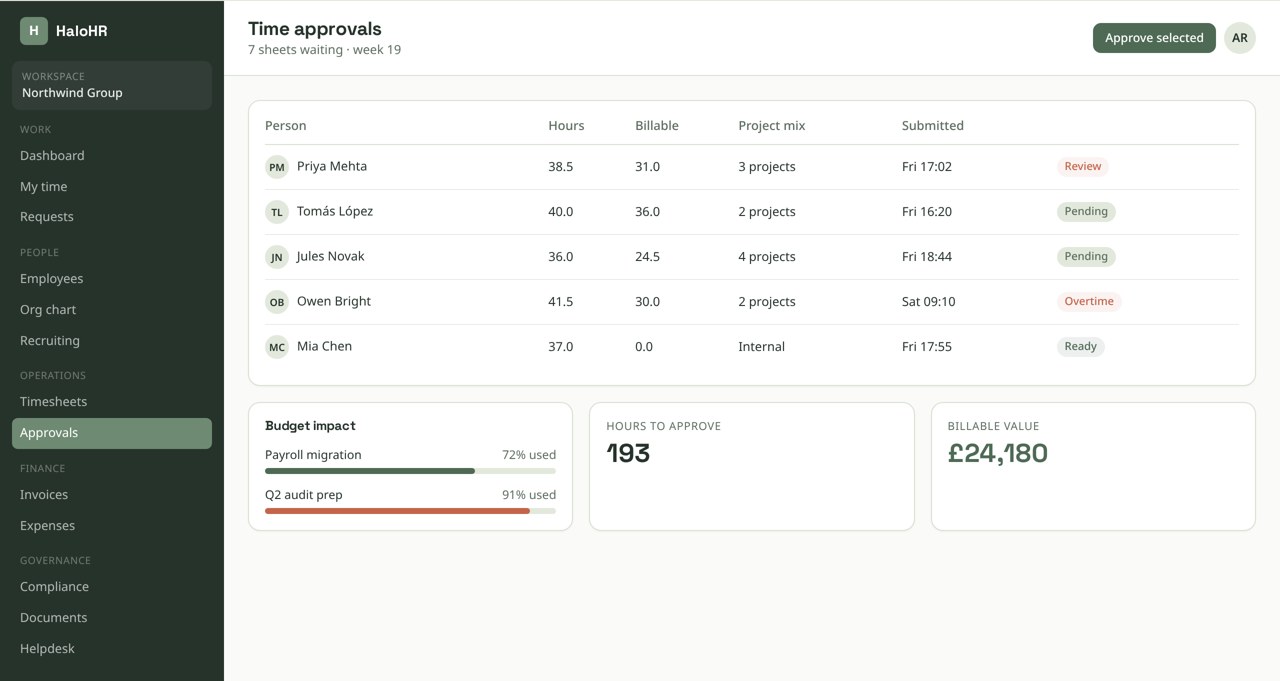
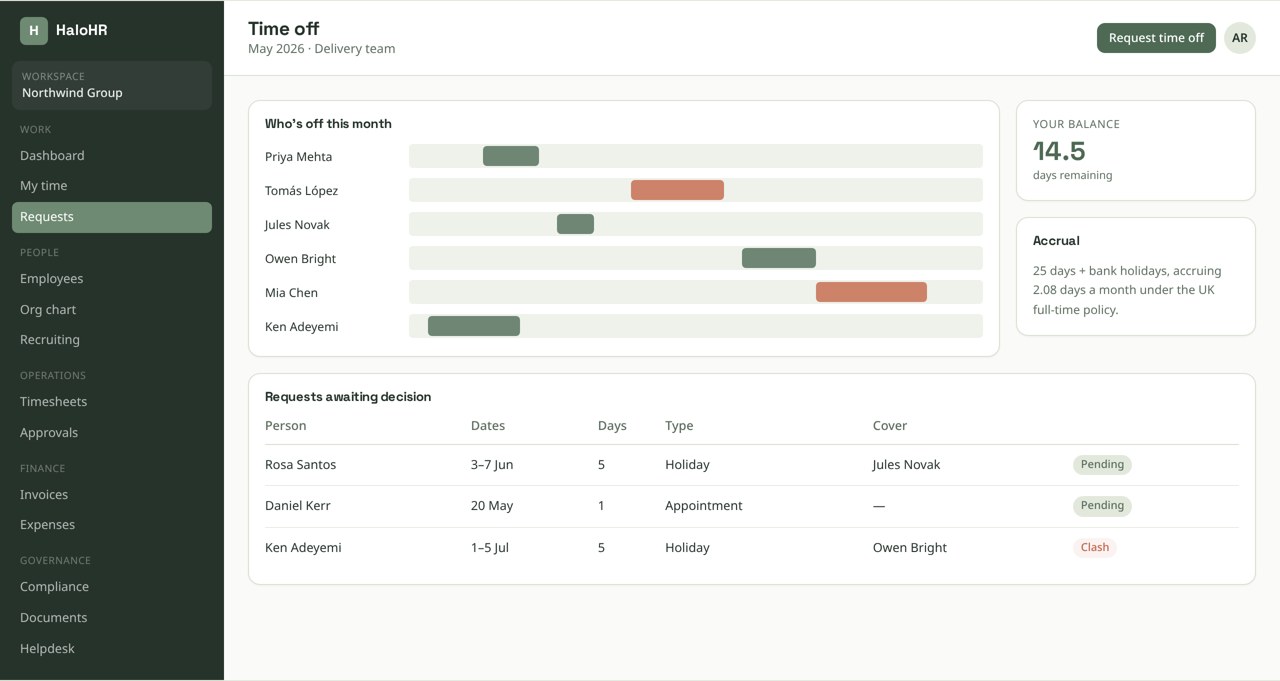
Screens shown with sample data from a demonstration workspace.
Pixi AI · Time & Work
Ask in plain language. Act on what comes back.
Reminders, escalations, and status changes fire from the same rules, so nothing sits in a queue because a person forgot to look.
It drafts and suggests; it never approves, hires, or pays anyone on its own.
How it runs
A week of billable time, end to end
The chain from a logged hour to an invoiced line item runs without anyone re-keying a number.
Consultant logs against a project
Time is entered daily from the timer or the grid. Rates come from the project assignment, so the consultant never sees or sets a billing rate.
Sheet submits on Friday
Submission locks the entries and routes to the assigned approver. Missing days are flagged before submission is allowed.
Manager approves the week
Approvers see hours by project and client alongside the budget remaining, then approve the sheet or send specific lines back.
Approved hours become an invoice draft
Billable time rolls into a draft invoice per client, grouped by project, ready to review and send from the Finance module.
Payroll and utilisation update
The same approved hours feed the pay run and the utilisation dashboard, so the numbers reconcile by construction.
From our founder
“We stopped chasing spreadsheets and started actually talking to people again.”
Sean Morrison — Founder, HaloHR

Built in
Correct by policy, not by habit
Time data goes wrong quietly. These controls catch it at entry rather than at month end.
- Overtime, break, and rest rules enforced at entry by jurisdiction
- Locked periods prevent edits to time that has already been billed or paid
- Approval chains follow the org chart automatically and reroute when a manager is out
- PTO balances calculate from the accrual policy rather than a maintained spreadsheet
- Every submission, approval, and edit is captured in the audit trail
Keep exploring
Connected to the rest of the platform
Every module writes to the same database, so a change in one place shows up everywhere else.