Compliance
Evidence ready before anyone asks.
Obligations, owners, due dates, and the documents that prove the work was done — held together instead of scattered across inboxes and shared drives.

This week
What's included
What the Compliance module covers
Built for firms carrying obligations on behalf of clients as well as internal teams answering to one regulator.
Compliance items & tasks
Every obligation has an owner, a cadence, a due date, and attached evidence. Tasks are scoped to the client they belong to.
Credentials
Licences, certifications, background checks, and right-to-work documents with expiry dates that warn the holder and their manager ahead of time.
Policies
Versioned policy library with distribution, read-and-acknowledge tracking, and a record of exactly which version a person signed.
Document register
A central index of what documents exist, who owns them, where they came from, and when they expire or must be destroyed.
Retention & data privacy
Retention schedules by record type, subject access request handling, and deletion workflows that respect legal hold.
Audit trail
Immutable log of who changed what and when across the workspace, exportable for an auditor without engineering involvement.

The screens
Compliance in the product
Screens from the working product, filled with sample data so you can see the shape of the thing before you talk to us.
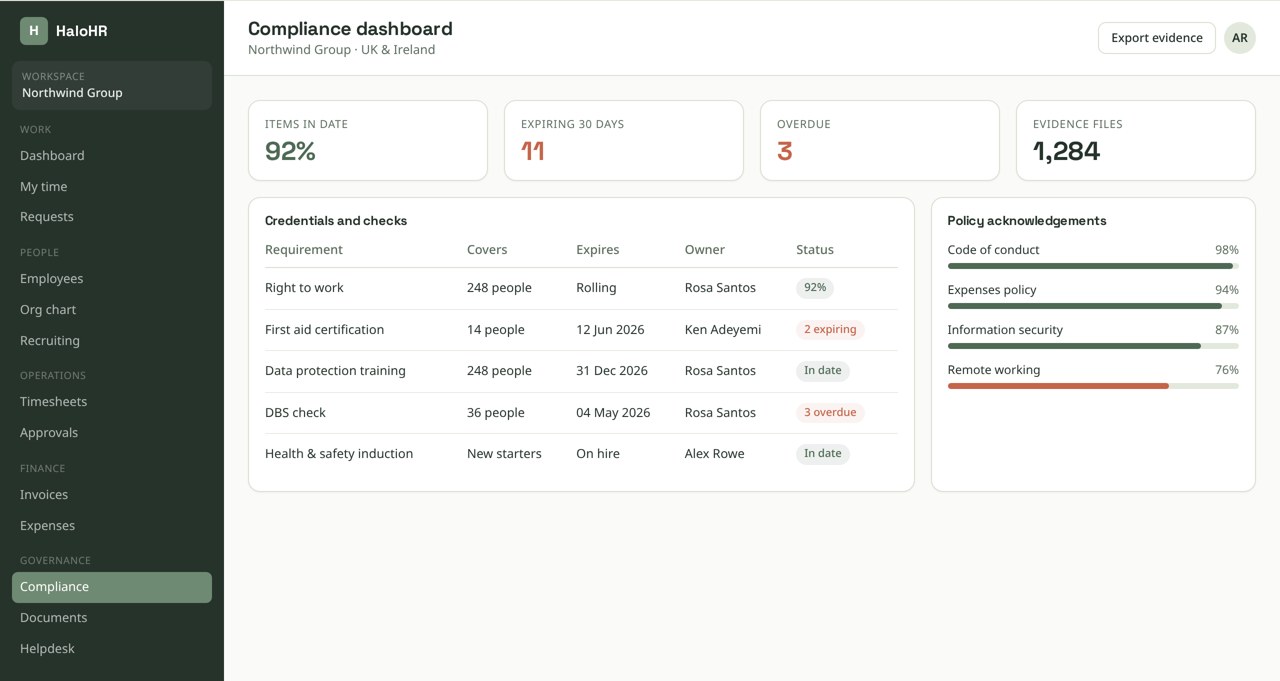
Screens shown with sample data from a demonstration workspace.
Pixi AI · Compliance
Ask in plain language. Act on what comes back.
Reminders, escalations, and status changes fire from the same rules, so nothing sits in a queue because a person forgot to look.
It drafts and suggests; it never approves, hires, or pays anyone on its own.
How it runs
Running a recurring obligation
An annual policy attestation is representative of how most obligations behave in the platform.
The obligation is defined once
Scope, owner, cadence, and the evidence required. For consultancies, it is attached to a specific client rather than the whole workspace.
Tasks generate on schedule
Each cycle creates tasks against the right people automatically. Nobody has to remember to start the round.
People complete and attest
Employees read the current policy version and acknowledge. The acknowledgement records the version hash and timestamp.
Gaps escalate
Outstanding items appear on the compliance dashboard and escalate to the manager, then to the owner, on your escalation ladder.
Evidence is exported on demand
The completed cycle — who, what version, when, with documents — exports as a single evidence pack.
From our founder
“We stopped chasing spreadsheets and started actually talking to people again.”
Sean Morrison — Founder, HaloHR
Built in
Scoped to exactly what a person should see
Compliance data is the clearest case for narrow access. HaloHR enforces the boundary in the database, not the interface.
- Client assignments limit users to the compliance items and tasks of the clients they are explicitly assigned to
- Row-level security applies the same filter to every read path, including reports and exports
- Evidence documents inherit the access rules of the item they support
- Legal hold blocks deletion even when a retention schedule would otherwise purge
- Sensitive records are access-scoped by role and RLS, and key writes are recorded in an append-only activity log
Keep exploring
Connected to the rest of the platform
Every module writes to the same database, so a change in one place shows up everywhere else.